
Table of Contents
ToggleHow to organize your week, choose realistic priorities, and make time for what matters—without creating another complicated planning system
Sunday evening—or maybe Monday morning—you know you have a lot to do.
There are appointments on the calendar.
Emails that need responses.
Something important at work.
A bill you have been meaning to pay.
Groceries.
A family responsibility.
A project you really need to make progress on.
And several things you are fairly certain you are forgetting.
So you start the week with a familiar thought:
I just need to get organized this week.
Then Monday gets busy.
Something unexpected happens Tuesday.
By Wednesday, urgent tasks have replaced important ones, and whatever plan you had mostly exists in your head.
For adults with ADHD, weekly planning can easily become one more thing to struggle with.
The answer is not necessarily a more elaborate planner, a better app, or a perfectly optimized schedule.
The goal is simpler:
Move the week out of your head and into a system you can see.
A good weekly plan reduces the amount your brain has to remember, decide, and continually reorganize.
You do not need to plan every hour.
You do not need to complete everything you planned.
You need enough external structure to know:
What matters this week?
When will I work on it?
Where do I look when I get off track?
That is what this lesson will help you build.
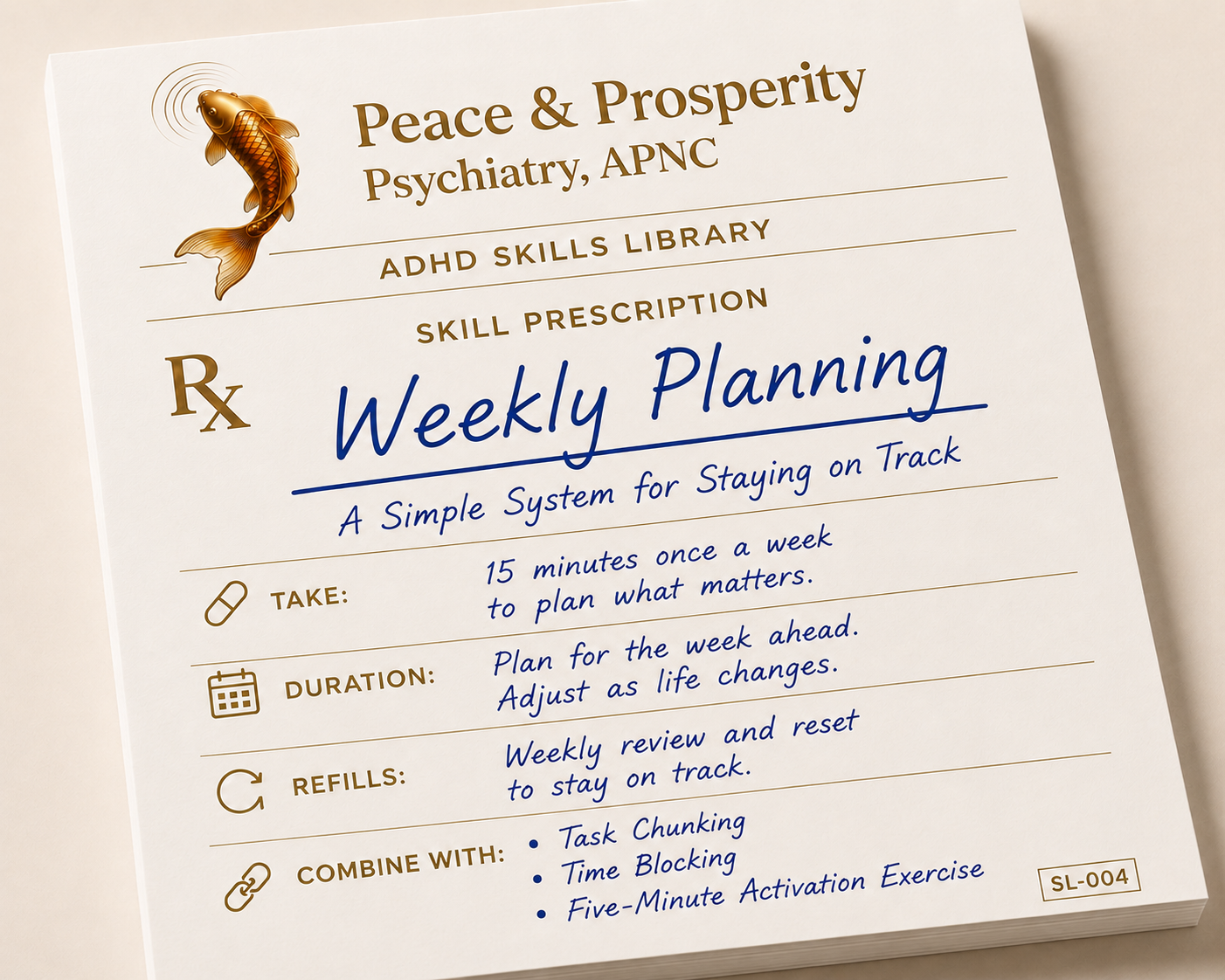
Quick Start: Weekly Planning for ADHD
Lesson: Weekly Planning
Lesson ID: SL-004
📄 Download the Companion Practice Sheet PDF: SL-004 Weekly Planning for ADHD PDF
ADHD Skills Library — Lesson #4
A practical system for deciding what matters, creating a realistic week, and giving important work a place to happen.
Use This Skill When
Try Weekly Planning when:
- You start the week without a clear plan.
- You have many things you intend to accomplish but do not know what to prioritize.
- You routinely put too much into individual days.
- Important tasks get pushed aside by whatever feels urgent.
- You forget appointments, deadlines, or follow-ups.
- Your tasks are scattered across calendars, email, notes, apps, sticky notes, and memory.
- You carry the same unfinished tasks from one week into the next.
- You create complicated planning systems and eventually stop using them.
What You’ll Do
- Review the calendar first.
- Capture what is competing for your attention.
- Choose the week’s priorities.
- Turn priorities into actionable blocks.
- Leave white space.
- Create one place to look.
- Review and reset when the week changes.
What Success Looks Like
Success =
- You knew what mattered.
- You had somewhere to look when you got off track.
- You adjusted when circumstances changed.
Success does not require =
- Completing everything you planned.
- That distinction matters.
- The purpose of Weekly Planning is not to create a perfect week.
- It is to make the week easier to manage.
Why Weekly Planning Can Help With ADHD
Managing an entire week mentally requires several executive functions at once.
You have to remember future commitments.
Estimate how much time you have.
Prioritize competing responsibilities.
Anticipate how long things will take.
Initiate tasks at the right time.
Remember what needs to happen later.
And reorganize the plan when something changes.
Adults with ADHD can experience difficulties involving working memory, planning, organization, time management, and other aspects of executive functioning, although the specific pattern varies from person to person (Posner et al., 2020).
Research also suggests that many adults with ADHD experience difficulties with aspects of time perception and prospective timing (Mette, 2023).
This can make the week difficult to manage entirely in your head.
Evidence-supported cognitive-behavioral treatments for adult ADHD therefore commonly teach external organizational strategies such as calendars, schedules, written task lists, prioritization, reminders, and progress monitoring (Lopez et al., 2018).
Weekly Planning uses those same general principles.
Importantly, the exact seven-step system in this lesson has not been established as a stand-alone ADHD treatment.
It is an evidence-informed way of putting several well-supported planning and organization principles into one practical routine.
Clinical Pearl
Do not ask your brain to remember the week.
Build the week somewhere your brain can look.
The Skill: The ADHD Weekly Planning System
Step 1: Look at the Calendar First
Do not start with your task list.
Start with reality.
Look at the entire upcoming week and identify what is already committed.
That may include:
- Work hours
- Meetings
- Appointments
- Family responsibilities
- Travel or commuting
- Deadlines
- Exercise
- Social plans
- Important personal commitments
Why start here?
Because your available time is not the 168 theoretical hours in a week.
It is whatever remains after sleep, work, appointments, meals, transportation, family responsibilities, recovery, and everything else that is already part of your life.
This is where many planning systems become unrealistic.
You look at one task and think:
I can do that this week.
And you probably can.
Then you say the same thing about 15 other tasks.
Individually, each one fits.
Together, they do not.
Clinical Pearl
A realistic weekly plan is a capacity plan, not a wish list.
Before deciding what you will do, look at what the week actually has room for.
Step 2: Capture What Is Competing for Your Attention
Now make one temporary list of everything asking for your attention.
Do not organize it yet.
Do not prioritize it yet.
Just capture it.
Write down:
- Tasks
- Deadlines
- Errands
- Follow-ups
- Household responsibilities
- Personal goals
- Unfinished work
- Things you keep reminding yourself not to forget
For example:
Finish presentation.
Pay electric bill.
Schedule dentist.
Buy groceries.
Submit expense report.
Exercise.
Order birthday gift.
Call insurance company.
Clean garage.
Research vacation.
The purpose is not to create another enormous to-do list.
The purpose is to empty the mental whiteboard.
When several intentions exist only in working memory, your brain may keep rehearsing them in an effort not to lose them.
Writing them down reduces the need to keep mentally reconstructing what still needs to happen.
Get the information out first.
Then decide what deserves your attention.
Step 3: Choose the Week’s Priorities
Now comes the part many planning systems avoid:
You have to choose.
Not everything can be a priority.
Try identifying one to three major priorities for the week.
These are the things that would make you say:
If I moved these forward, this week would matter.
Then identify a limited number of smaller responsibilities that genuinely need attention.
For example:
Major Priorities
- Finish the work presentation.
- Submit insurance paperwork.
- Exercise three times.
Smaller Responsibilities
- Pay electric bill.
- Call dentist.
- Buy birthday gift.
The garage may still need cleaning.
The vacation may still need planning.
Those things do not disappear.
They simply do not automatically become promises for this week.
There is an important difference between:
Things I would like to accomplish
and
Things this week realistically has capacity for.
Clinical Pearl
A task list tells you everything you could do.
A weekly plan tells you what this week actually has room for.
Step 4: Turn Priorities Into Actionable Blocks
This is where the skills from the previous ADHD Skills Library lessons begin working together.
Suppose one of your priorities is:
Finish presentation.
That is still a project.
First, use Task Chunking to identify the next actionable step.
For example:
Project: Finish presentation.
Next chunk: Create the presentation outline.
Then use Time Blocking to give that action a place in the week.
Tuesday, 9:00–9:45 a.m. — Create presentation outline.
Now the task is no longer floating somewhere in the future.
It has a specific action and a specific time.
And if Tuesday at 9:00 arrives and your brain still does not want to begin, use the Five-Minute Activation Exercise:
Open the presentation.
Set the timer.
Work for five minutes.
This creates a simple progression:
Weekly Planning: What matters this week?
Task Chunking: What exactly should I do?
Time Blocking: When will I do it?
Five-Minute Activation: How do I get started when the time arrives?
You do not need to time-block every task in your life.
Reserve actual time for work that is important enough that you do not want to leave it to chance.
Step 5: Leave White Space
Do not schedule every available opening.
A calendar can look beautifully organized when every hour has an assignment.
It can also collapse by 10:30 Monday morning.
Tasks take longer than expected.
Meetings run late.
People interrupt you.
You get tired.
Traffic happens.
Something urgent appears.
ADHD-related difficulties with time perception and estimation can make accurate scheduling even harder for some adults (Mette, 2023).
So leave margin.
Build space for:
- Transitions
- Interruptions
- Tasks that run long
- Unexpected problems
- Fatigue
- Catch-up
- Rest
You do not need to calculate a scientifically perfect percentage of buffer time.
There is no established ideal ADHD buffer.
Just resist the urge to fill every opening.
White space is not wasted time.
It is what gives the rest of the plan room to survive.
Step 6: Create One Place to Look
Your plan needs a home.
That does not mean every piece of information must live in one application.
You might use a calendar for appointments and a task list for everything else.
But when you find yourself asking:
“What am I supposed to be doing?”
you should know where to look.
Problems multiply when your commitments are scattered across:
Your calendar.
Your email inbox.
A notebook.
Three sticky notes.
Two task-management apps.
Your notes app.
Text messages.
And whatever you are hoping you will remember.
Choose a simple home base.
For some people that will be a digital calendar.
For others, a paper planner.
For others, a calendar plus one master task list.
The best system is not the one with the most features.
The best system is the one you reliably return to.
Clinical Pearl
I personally have had great success with Google Calendars. One place that can manage and color code multiple calendars and tasks; Work, Family, Personal, Exercise.
Step 7: Review and Reset
Your weekly plan is not a contract.
Life will change.
A task may take twice as long as expected.
Your child may get sick.
A work problem may suddenly become urgent.
You may wake up exhausted.
Something you thought mattered on Monday may not matter nearly as much by Thursday.
When the plan stops matching reality, do not abandon it.
Reset it.
Ask:
What changed?
What still matters?
What needs to move?
What can I drop?
Then update the week.
Clinical Pearl
Adjusting the plan is part of planning.
A good planner is not someone whose schedule never changes.
A good planner notices that reality changed and updates the plan accordingly.
What Weekly Planning Looks Like in Real Life
Consider Maya.
She works full time and begins Monday with this list:
- Finish presentation
- Catch up on email
- Exercise four times
- Attend medical appointment
- Clean garage
- Buy groceries
- Pay bills
- Schedule dentist
- Help daughter with school project
- Read three chapters of a book
- Organize closet
- Research vacation
- Complete expense report
- Meal prep
- Call friend
Nothing on the list is unreasonable.
The problem is the total.
Maya looks at her calendar first.
She has a medical appointment Tuesday afternoon.
A late meeting Wednesday.
Her daughter has a school event Thursday evening.
Several meetings already occupy large parts of Monday and Wednesday.
The week suddenly looks smaller.
She chooses three priorities:
- Finish the presentation.
- Complete the expense report.
- Exercise three times.
Then she identifies smaller responsibilities:
Pay bills.
Buy groceries.
Schedule dentist.
Next she turns the presentation into actionable work.
Monday, 10:00–10:45 — Create presentation outline.
Tuesday, 8:30–9:15 — Build first half of presentation.
Friday, 9:00–10:00 — Finish and review presentation.
She schedules the expense report for Wednesday at noon.
She puts groceries after Tuesday’s appointment because she will already be near the store.
And she leaves part of Friday afternoon open.
Then Wednesday happens.
An urgent work problem consumes the time she planned for the expense report.
The week is not ruined.
Maya looks at her plan.
The expense report still matters.
Friday afternoon has capacity.
She moves it.
The garage, closet, vacation research, and book are still available later.
They simply were not this week’s priorities.
That is the system working.
Not because everything went according to plan.
Because Maya knew what mattered and knew how to recover when it did not.
The 15-Minute Weekly Planning Routine
You do not need a two-hour Sunday planning ritual.
Start with 15 minutes.
The timing is only a guide.
Minutes 1–3: Review the Calendar
Look at the upcoming week.
Identify fixed commitments, appointments, deadlines, and time that is already spoken for.
Minutes 4–6: Capture
Write down everything competing for your attention.
Do not organize it yet.
Get it out of your head.
Minutes 7–9: Prioritize
Choose one to three major priorities.
Identify a manageable number of smaller responsibilities.
Minutes 10–12: Chunk and Schedule
Turn important projects into actionable steps.
Give the most important work specific places in the week.
Minutes 13–14: Add Buffer
Look for an overpacked schedule.
Move or remove something if necessary.
Leave room for real life.
Minute 15: Review
Look at the whole week and ask:
Does this look like a week a real human being could actually live?
If not, reduce the plan.
That may be the most important planning decision you make.
If You Get Stuck
“I Made the Plan but Didn’t Follow It.”
Do not immediately conclude that planning does not work for you.
Look at what happened.
Did you forget to check the plan?
Was the task too vague?
Was the time block unrealistic?
Did you underestimate how long something would take?
Did you schedule difficult work when you were already depleted?
That information helps you build a better plan next week.
“I Put Too Much on the Schedule.”
Plan less.
If you repeatedly complete only half of what you schedule, your actual capacity may simply be lower than your planning estimate.
Use last week as evidence.
Your calendar should adapt to reality.
Reality does not need to adapt to your calendar.
“Something Unexpected Ruined the Week.”
Something unexpected changed the week.
It did not necessarily ruin it.
Return to the plan.
Ask what still matters.
Move what needs to move.
Drop what no longer fits.
“I Forgot to Look at the Plan.”
Make the plan easier to encounter.
Keep the calendar open.
Leave the paper planner somewhere visible.
Create a shortcut on your phone.
Use a reminder at the beginning of the day.
An external system only works if you reconnect with it.
“I Procrastinate on Weekly Planning.”
Make the planning session smaller.
Do not tell yourself:
I need to organize my entire life.
Tell yourself:
I am going to look at next week for 15 minutes.
Then use:
Calendar → Capture → Priorities → Chunk → Schedule → Buffer → Review
Stop there.
“I Keep Changing Planning Apps.”
Sometimes switching tools is useful.
Sometimes building a new system feels easier than using the old one.
Before changing apps, ask:
What specific problem will the new tool solve?
If you cannot answer that clearly, consider staying with the system you already have.
Your planning system does not need to be interesting.
It needs to be dependable.
Practice Prescription
Your Assignment This Week
Before the next week begins:
Set aside approximately 15 minutes.
Run the Weekly Planning System once.
- Review the calendar.
- Capture what needs attention.
- Choose one to three priorities.
- Chunk and schedule important work.
- Leave some buffer.
- Put the plan somewhere you will look.
- Review it once during the week and adjust.
That is enough.
Do not try to build the perfect planning system.
Practice building one realistic week.
How the First Four Skills Work Together
You now have four different tools for four different executive-function problems (to read more about that lesson, just click the link).
Five-Minute Activation
Answers: “How do I start?”
Task Chunking
Answers: “What exactly should I do?”
Time Blocking
Answers: “When will I do it?”
Weekly Planning (this lession)
Answers: “How do I organize all of this across the week?”
These skills are designed to work together.
You do not need to use every skill for every task.
Use the smallest amount of structure that helps.
That is the larger goal of the ADHD Skills Library:
Not to create a complicated productivity system.
To create practical external supports you can use when executive function becomes unreliable.
Your Planning System Works for You
Weekly Planning is not about squeezing maximum productivity out of your life.
It is not about completing the largest possible number of tasks.
And productivity is not a measure of your worth.
The purpose is to create:
More clarity.
Less cognitive load.
More realistic expectations.
Better follow-through.
More room for what actually matters.
The system serves you.
You do not serve the system.
So success at the end of the week does not have to mean:
I completed everything I planned.
A better definition is:
I knew what mattered.
I had somewhere to look when I got off track.
And when life changed, I adjusted.
That is what an ADHD-friendly weekly planning system is supposed to do.
It should make life easier—not become another standard you feel you are failing to meet.
Continue Learning About ADHD
Weekly planning can make life easier by moving some of the work of planning, remembering, and prioritizing into an external system. If you want to better understand why these challenges occur, continue with:
- Executive Function and ADHD — Start with the bigger picture of how ADHD can affect planning, organization, working memory, time management, and follow-through.
- Working Memory and ADHD: Why You Keep Forgetting Things — Learn why intentions and tasks can disappear from awareness, and why external systems can help.
- Executive Dysfunction and ADHD — Understand why knowing what needs to be done does not always translate into doing it.
- Time Blindness and ADHD — Explore why estimating, sensing, and managing time can be particularly difficult with ADHD.
References
Liu, Y., Zhu, F., Yu, Y., et al. (2026). A meta-analysis of the intervention effect of cognitive behavioral therapy on adult ADHD. Journal of Affective Disorders, 121107. https://doi.org/10.1016/j.jad.2025.121107
Lopez, P. L., Torrente, F. M., Ciapponi, A., et al. (2018). Cognitive-behavioural interventions for attention deficit hyperactivity disorder (ADHD) in adults. Cochrane Database of Systematic Reviews, 3, CD010840. https://doi.org/10.1002/14651858.CD010840.pub2
Mette, C. (2023). Time perception in adult ADHD: Findings from a decade—A review. International Journal of Environmental Research and Public Health, 20(4), 3098. https://doi.org/10.3390/ijerph20043098
Nakashima, M., Inada, N., Tanigawa, Y., et al. (2022). Efficacy of group cognitive behavior therapy targeting time management for adults with attention deficit/hyperactivity disorder in Japan: A randomized control pilot trial. Journal of Attention Disorders, 26(3), 377–390. https://doi.org/10.1177/1087054720986939
Posner, J., Polanczyk, G. V., & Sonuga-Barke, E. (2020). Attention-deficit hyperactivity disorder. The Lancet, 395(10222), 450–462. https://doi.org/10.1016/S0140-6736(19)33004-1